See buyer-agent compensation while you browse
The Find BAComps Chrome extension shows disclosed buyer-agent compensation (BAC) on listing pages you already use — so you do not have to leave Zillow, Redfin, or your MLS to look it up.
Why agents use the extension
Built for busy realtors — not for tech people.
-
See compensation on the listing
When a property address matches Find BAComps, disclosed buyer-agent compensation appears while you browse — no extra tabs or copy-paste.
-
Save time before showings
Know seller-offered terms before you schedule a tour or draft an offer — instead of hunting for compensation after the fact.
-
Clearer client conversations
Share listing-specific compensation with buyers so they understand who may fund the buyer-side fee — not market rumors.
-
Works on the sites you already use
Free with a Basic account on Zillow and Redfin. Paid plans unlock MLS sites. Same Find BAComps login either way.
Install in about 2 minutes
Follow these steps in order. You need a Chromium browser (Chrome, Edge, Brave, etc.) and a Find BAComps account.
- 1
Create or sign in to Find BAComps
If you do not have an account yet, register first. Use the same email you will use every day — the extension signs in with that account.
- 2
Open the Chrome Web Store
Click the button below. It opens the official Find BAComps listing in a new tab. Works in Chrome, Edge, and other Chromium browsers (not Safari or Firefox).
- 3
Click “Add to Chrome”
On the store page, click the blue Add to Chrome button (Edge may say Add extension). Confirm when the browser asks.
You may see a puzzle-piece icon in the top-right of the browser. That means it installed successfully.
- 4
Pin it (optional, but helpful)
Click the puzzle-piece icon in your browser’s toolbar, find Find BAComps, and click the pin so the icon stays visible.
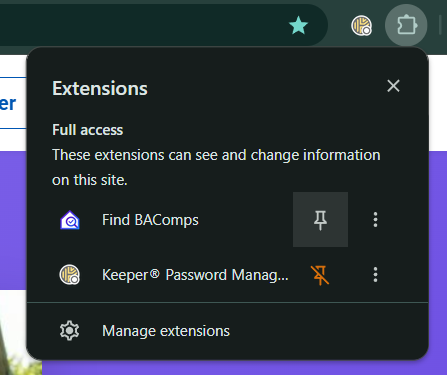
Click the puzzle piece, then click the pin next to Find BAComps. - 5
Log in from the extension
Click the Find BAComps icon. If it says you are not logged in, click Log In to Website. Sign in with your Find BAComps account, then return to the listing page and click the icon again.
Stay signed in on findbacomps.com in the same browser — the extension uses that same login.
- 6
Open a listing and look for BAC
Go to a home on Zillow or Redfin. When Find BAComps has matching compensation data, it appears on the page while you browse.
MLS sites need a paid plan (Realtor or Pro Realtor). See plans or founding member pricing.
See the extension in action
A short walkthrough of search, listing BAC, and the Chrome extension.
Common questions
Do I need a paid plan?
No for Zillow and Redfin — a free Basic account is enough. MLS sites require Realtor or Pro Realtor. Compare plans.
Does it work on my phone?
No. The extension works on a computer in Chrome, Edge, or another Chromium browser — not on phones or tablets.
I installed it but nothing shows up
Check three things: (1) you are in Chrome, Edge, or another Chromium browser, (2) you clicked Log In and signed in to Find BAComps, (3) the listing address exists on Find BAComps. Not every listing has disclosed compensation yet.
Is this safe?
Yes. It is published on the official Chrome Web Store. It only looks for property addresses on pages you visit so it can match compensation data from Find BAComps. Details are in our Privacy Policy.
What's new?
Version 1.4 (July 2026) clarifies Sign in vs Upgrade prompts, fixes lookups that stalled on large search pages, speeds up batch checks, and isolates the sidebar so sites like realtor.com cannot crush the UI.
Ready to install?
Open the Chrome Web Store, click Add to Chrome, then sign in with your Find BAComps account.
Add to Chrome Create a free account first